
Fielding the same questions day after day drains your team, slows your operations, and costs you jobs. For Irish trades businesses handling quotes, scheduling, and follow-ups manually, the backlog builds fast. AI-driven automation changes that equation entirely. Businesses that have implemented structured inquiry automation report response times cut by up to 87% and automation rates reaching 92%. This guide walks you through every stage of building a customer inquiry automation workflow that actually works for Irish trades, from preparation through to ongoing optimisation.
Table of Contents
- Why automate customer inquiries in trades?
- What you need for a customer inquiry automation workflow
- Step-by-step: Building your customer inquiry automation workflow
- Verifying success and ongoing improvements
- Take your inquiry workflow to the next level
- Frequently asked questions
Key Takeaways
| Point | Details |
|---|---|
| Automate routine queries first | Start your workflow by targeting FAQs and repeatable tasks for quick efficiency wins. |
| Preparation is essential | Accurate data and internal alignment help avoid common automation pitfalls. |
| Hybrid approach wins | Blend AI for high-volume tasks and human intervention for nuanced cases to protect trust. |
| Measure and improve | Track metrics like automation rate and response times to ensure ongoing workflow success. |
Why automate customer inquiries in trades?
Irish trades businesses field a relentless mix of inbound queries every single day. Customers ring about quotes, ask about job timelines, want to know if you cover their area, or need to reschedule an appointment. Each one takes time. Multiply that across a busy week and you have a serious operational drag that pulls your team away from billable work.
The numbers make a compelling case for change. Businesses that implement AI in customer service consistently report automation rates between 60% and 92%, with response times dropping by 67% to 87%. The financial impact is equally striking, with monthly savings ranging from €15,000 to €48,000 and ROI figures of 6x to 11x within the first year.
But automation is not a silver bullet. Poorly configured AI that gives wrong answers or fails to escalate upset customers can damage trust quickly. Research confirms that AI risks trust loss when it handles nuanced or sensitive situations without human oversight. That is why the most effective approach is a hybrid model: AI handles volume and speed, humans handle complexity and emotion.
Here is what a well-designed automation workflow delivers for trades:
- Instant responses to common queries, 24 hours a day, 7 days a week
- Consistent, accurate information across every channel
- Reduced admin burden on your office staff and field team
- Faster lead qualification and appointment booking
- Scalable capacity without adding headcount
For AI tools for plumbers and other trades, the gains are not theoretical. They are measurable and achievable within a structured rollout.
What you need for a customer inquiry automation workflow
Rushing into automation without preparation is the most common reason workflows fail. Before you configure a single AI rule, you need the right resources in place. A phased implementation approach typically spans 10 to 12 weeks, starting with a two-week assessment before any technical work begins.

| Resource | Example | Why it matters |
|---|---|---|
| Staff time | 2 to 4 hours per week from an owner or manager | Keeps the project moving and decisions made |
| Knowledge base | Written answers to your 30 most common queries | Feeds the AI with accurate, business-specific content |
| CRM or job management system | Tradify, ServiceM8, or similar | Enables automated status updates and booking |
| Historical inquiry data | 3 to 6 months of emails or call logs | Reveals patterns and priority automation targets |
| Shared inbox or helpdesk tool | Gmail shared inbox, Freshdesk | Centralises all incoming queries for AI to manage |
You will also need clear escalation rules documented before go-live. Who gets notified when a customer is unhappy? What happens when the AI cannot answer confidently? These decisions need an owner, not a committee.
Pro Tip: Assign a single person, ideally the business owner or operations manager, to own the automation project from start to finish. Projects without a clear owner stall at the configuration stage and rarely recover.
The AI automation guide for trades covers how to structure your knowledge base effectively. For managers overseeing multiple trades categories, AI tools for business managers outlines the broader toolkit worth considering at this stage.
Step-by-step: Building your customer inquiry automation workflow
A structured build prevents the most common pitfalls. Follow these five stages in order and you will have a workflow that handles real volume from day one.
-
Assess your inquiry patterns (weeks 1 to 2). Pull three to six months of emails, call logs, and chat records. Categorise every query type and count frequency. You are looking for the top 10 to 15 query types that account for 70% or more of your total volume. These become your first automation targets.
-
Build your knowledge base (weeks 3 to 5). Write clear, accurate answers to every query type identified in step one. Include your service areas, pricing ranges, booking process, and common FAQs. This is the content your AI will draw from, so accuracy here directly determines answer quality.
-
Configure AI and escalation paths (weeks 6 to 7). Set up your AI platform with the knowledge base content. Define escalation triggers: low confidence scores, negative sentiment detected, queries involving complaints or legal matters. Integrate with your CRM so the AI can pull live job status data. Review voice agent integration options if you want to extend automation to inbound calls.
-
Test and train (weeks 8 to 9). Run the AI against real historical queries before going live. Score its responses for accuracy and tone. Identify gaps in the knowledge base and fix them. Test every escalation trigger manually. Follow best practices for deployment to avoid common configuration errors at this stage.
-
Monitor and optimise (ongoing). Go live with a limited query set first, then expand. Review performance weekly for the first month, then monthly thereafter. Update the knowledge base whenever your services, pricing, or processes change.
Pro Tip: Start automation with your highest-volume, simplest queries first. Scheduling confirmations and service area questions are ideal. Quick wins build team confidence and give you clean data to refine the system before tackling more complex query types.
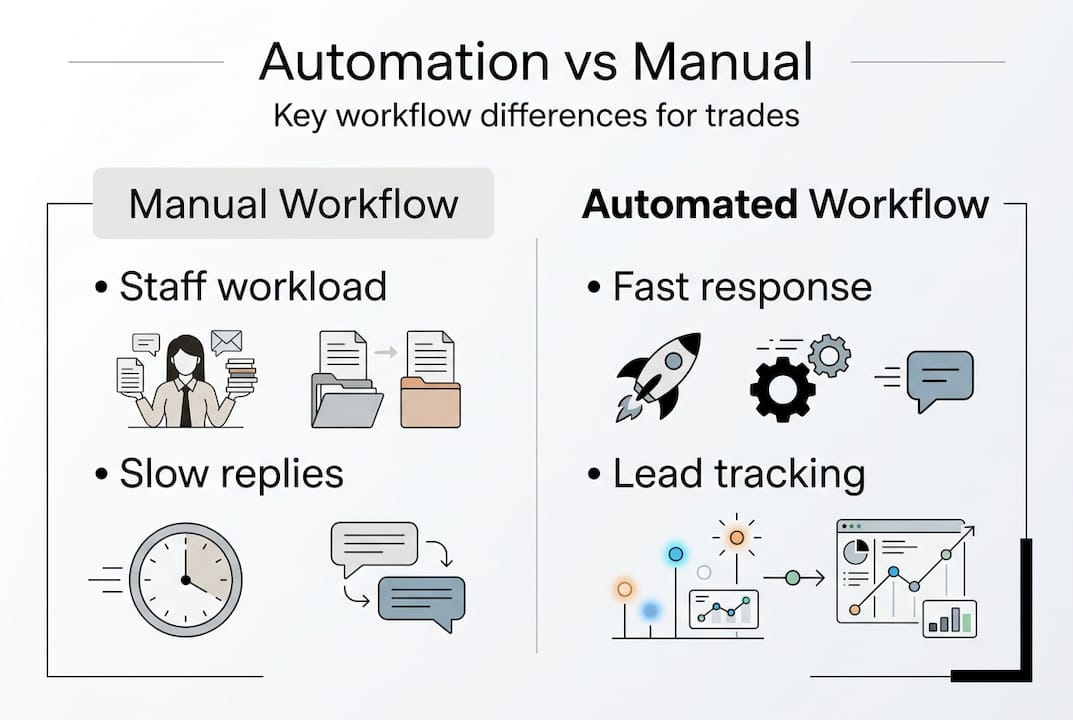
The comparison below shows what changes when you move from manual to automated handling:
| Factor | Manual workflow | Automated workflow |
|---|---|---|
| Workload | High, repetitive, staff-dependent | Distributed across AI and staff |
| Accuracy | Variable, depends on individual | Consistent, knowledge-base driven |
| Speed | Hours to days | Seconds to minutes |
| Scalability | Limited by headcount | Scales without additional cost |
For trades businesses focused on revenue growth, qualifying leads with AI adds another layer of value on top of inquiry handling, filtering serious prospects from tyre-kickers automatically.
Verifying success and ongoing improvements
Once your workflow is live, measurement is everything. Without clear metrics, you cannot tell whether the AI is helping or quietly causing problems. Track these four indicators from week one:
- Automation rate: What percentage of inquiries are resolved without human involvement? Target 60% or above within the first 90 days.
- Response time: How quickly does the first response reach the customer? Benchmark against your pre-automation average.
- Escalation rate: What proportion of queries are being handed to a human? A very high rate suggests gaps in your knowledge base.
- Customer satisfaction score: Collect post-interaction ratings to confirm quality is maintained alongside speed.
The automation ROI in trades is well documented, with savings of €15,000 to €48,000 monthly achievable at scale. But those numbers depend on continuous improvement, not a one-time setup.
"AI excels at routine tasks but risks trust loss from hallucinations and poor escalations. The hybrid model, AI for scale and humans for nuance, consistently outperforms full automation." This is not a limitation to work around. It is a design principle to build into your workflow from the start.
Common troubleshooting issues to watch for include:
- Poor input data quality: If your knowledge base has outdated pricing or incorrect service areas, the AI will confidently give wrong answers.
- Missing escalation triggers: Upset customers who are not escalated quickly become lost customers. Review sentiment detection settings regularly.
- Lack of retraining: Your business changes. Your AI needs to reflect those changes. Schedule a quarterly knowledge base review as a standing task.
The benefits of AI customer service compound over time as the system learns from real interactions. Businesses that treat automation as a living system rather than a fixed tool see the strongest long-term results. Human oversight remains essential for complex or sensitive situations, particularly complaints, regulatory queries, and anything involving pricing disputes.
Take your inquiry workflow to the next level
Building a customer inquiry automation workflow from scratch takes time, technical knowledge, and ongoing commitment. For Irish trades businesses that want results without the complexity, Apex Emerald AI delivers a turnkey solution built specifically for your market.
Our AI voice agents platform handles inbound calls, qualifies leads, and books appointments around the clock, without adding a single person to your payroll. The full suite of automation solutions for trades covers every channel your customers use, from phone to web chat to email. Not sure where to start? Our AI audit consultation gives you a clear picture of your current setup and a prioritised roadmap for automation. Irish trades businesses working with us typically see measurable ROI within 90 days. Get in touch to find out what that looks like for your operation.
Frequently asked questions
What types of customer inquiries should be automated first?
Start with high-volume, low-complexity queries such as FAQs, service area checks, and appointment scheduling. These deliver the fastest wins and the cleanest data for refining your system.
How long does it take to implement an AI-driven workflow?
A phased rollout takes 10 to 12 weeks from initial assessment through to go-live, though businesses with well-organised data and a clear owner can move faster.
How does automation affect customer satisfaction for trades?
Done correctly, automation improves satisfaction by delivering response times up to 87% faster and consistent, accurate answers regardless of time of day.
Are there risks in automating all types of inquiries?
Yes. AI risks trust loss when handling complaints, regulatory questions, or emotionally charged situations without human involvement. Always build escalation paths for these scenarios.